Organize your photos
automatically.

No More Duplicates is the professional Windows utility to find identical and similar photos instantly. Reclaim your storage and keep only your best memories with smart local scanning.

Free Download
91 MB • Version 3.0
100% Private & Local
🔄 Recently updated for improved scan reliability.
If you downloaded earlier, grab the latest version.
Thanks to early users whose feedback helped improve this 🙌.
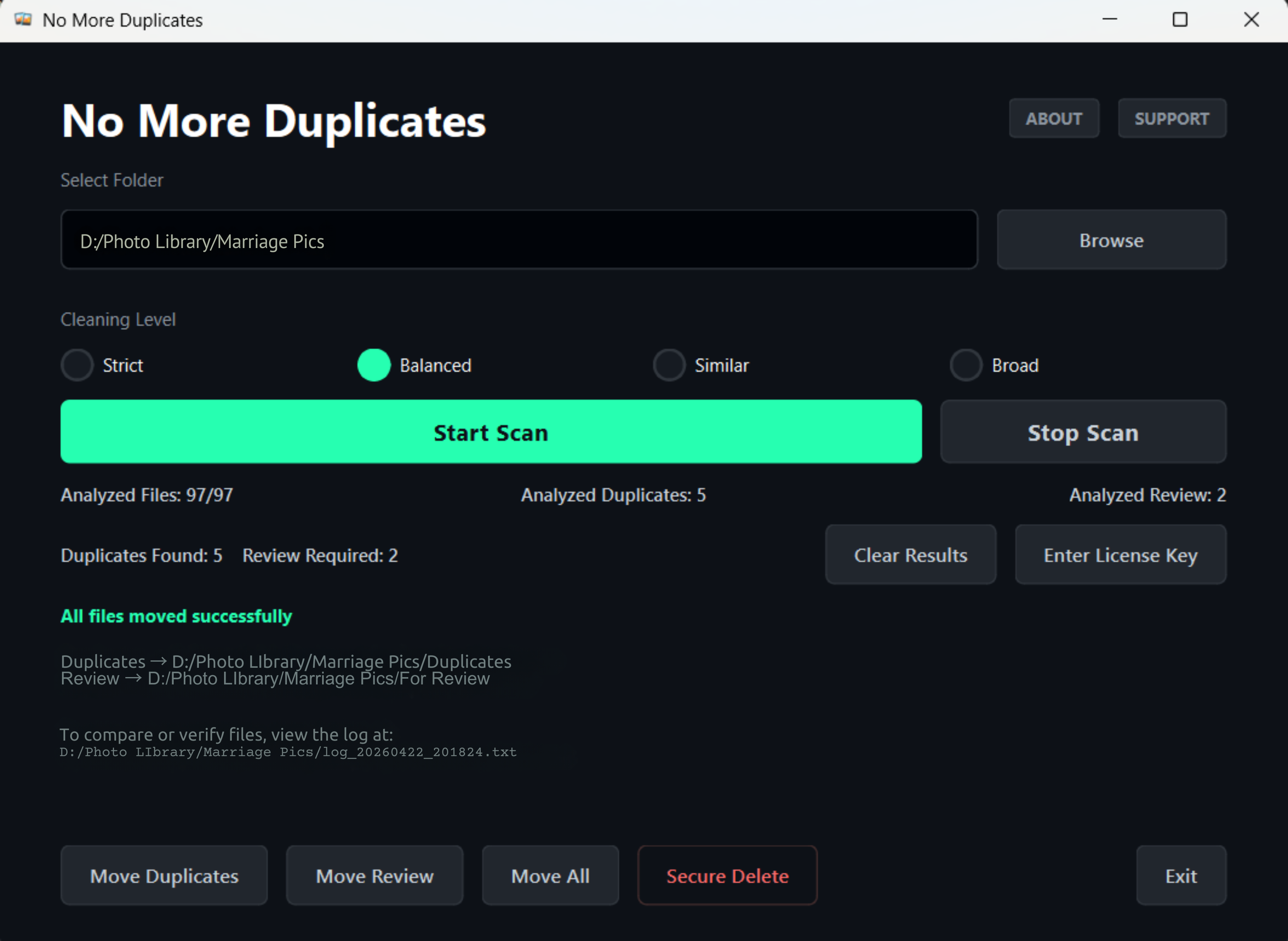
Documentation & Workflow
NMD Software User Interface - Scan Completed on Windows

Free Download Includes

Unlimited folder scanning
Duplicate photo detection
Similar image detection
Move up to 25 files for free
Not sure if the free edition is enough for you?
Compare Free & Pro →

🎥 Video Walkthrough Coming Soon

Complete NMD walkthrough
Duplicate scan demo
Similar image detection
Safe cleanup workflow
See exactly how NMD works before downloading.
🎬 Demo Video • Coming Soon
Trusted Performance • Secure Scanning • No Cloud Uploads

Why Choose Our Windows Duplicate Cleaner?

The most accurate way to declutter your image library on PC.

MD5 Binary Scan

Goes beyond filenames. Our tool analyzes the actual bits of each file to find exact duplicates even if they have different names.

Visual Similarity

Proprietary algorithms detect "burst shots" and similar photos, letting you choose the best shot from a series.

Safe-Review Move

Nothing is ever deleted permanently without your say-so. Files are moved to a review folder for your final approval.

Massive Speed

Engineered for speed. Scan 10,000+ photos in minute without slowing down your computer.

Zero Cloud Risk

Unlike other apps, your photos never leave your hard drive. We don't use servers, ensuring 100% privacy.

Smart Selection

Auto-mark duplicates based on date, size, or resolution to speed up the cleaning process.

How NMD Works

1

Add Folders

Select the local folders or external drives you want to clean.

2

Auto Scan

Let NMD identify exact matches and similar-looking clusters.

3

One-Click Clean

Review the results and move all duplicates to the bin instantly.

What Users Say

★★★★★

I had duplicate photos from two phone backups and didn't realize how much space they were taking. Recovered around 21 GB in one cleanup. The review folder made me feel safe before deleting anything.

Rahul Singh

Delhi, India

★★★★☆

Scan took a little longer on my external drive than I expected, but it found a lot of duplicate videos that Windows search completely missed. Worth the wait.

Michael Carter

Texas, USA

★★★★★

Finally cleaned years of downloaded files and old backups. I like that files are moved first instead of being deleted immediately. Much less stressful.

Emily Johnson

California, USA

★★★★☆

Interface is simple enough that I didn't have to read any instructions. Found hundreds of duplicate screenshots from old backups.

Daniel Brooks

Florida, USA

Clean Your PC Storage in Minutes

Stop wasting time manually sorting duplicate files.

₹499 One-time • Lifetime access

No subscription • Pay once and use forever

✓ Scan photos, videos & audio files
✓ Detect similar & edited images
✓ One-click cleanup for large folders
✓ Keeps best quality automatically
✓ Safe cleanup (nothing's deleted ever)
Scan any volume of data • 25-file limit on move operations
Unlock Pro for ₹499

Instant access after purchase • No recurring charges

Notice: As a new professional utility, Windows SmartScreen may flag the installer as "Unknown Publisher". Click "More Info" and "Run Anyway" to complete installation.